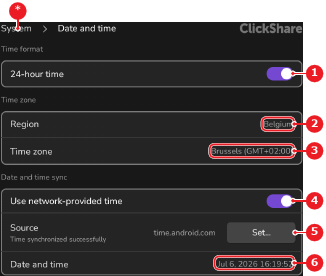
Location & availabilityMenu: More > Settings > Device settings > System > Date and timeAccess level: admin
About time formatThe way time is represented in the user interface can be changed to one of the following options:12-hour format, using the ‘AM’ or ‘PM’ suffix.24-hour format, without a suffix.
How to changeHow must the time be displayed?For 12-hour format, disable the toggle button after 24-hour time.For 24-hour format, enable the toggle button after 24-hour time.Image 7–27 1Time format toggle2Region drop down3Time zone drop down4Network time toggle5Time server menu6Calendar menu*Return button