7.6.7 Privacy

Location & availability
About privacy

Privacy holds a link to the privacy portal of the room system provider.

How to manage
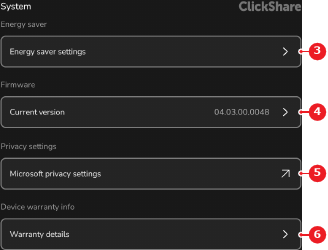
  1. Tap on the privacy setting of the desired room system provider after Privacy settings (reference 5).

    Image 7–31
    1
    Language drop down
    2
    Date and time menu
    3
    Energy saver menu
    4
    Software menu
    5
    Privacy settings link
    6
    Warranty menu

    A browser showing the room system provider portal opens.

  2. Adjust the privacy settings using the portal. For more information, see the documentation of the room system provider.