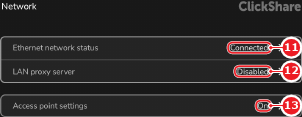
7.4.2 Proxy server

Proxy
A proxy is a server that secures network traffic. Any network device that makes use of the proxy must be configured to communicate with that proxy server. The proxy server will then handle the network traffic to and from the network device in a secure manner.
IP address
An IP address is a numeric address given to a device on a network. A generation four address (IPv4) is built up using four digits between ‘0’ - ‘255’, for example ‘192.168.0.50’. This allows different network devices to find each other on the network.
LAN
A Local Area Network (LAN) is a collection of network enabled devices in the same physical site or building. Typically all network devices in the same LAN have the same IP address range.
Location & availability
About proxy

There are two main types of proxy networks:

For more information on which proxy server is being used at the installation location, contact the local IT department.

How to configure
  1. Must an explicit proxy server be configured?
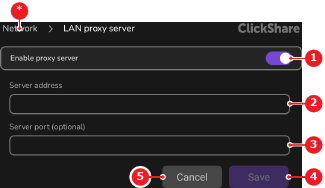
    • If no, disable the toggle button after Enable proxy server (reference 1). No further actions required.
    • If yes, enable the toggle button after Enable proxy server (reference 1).
    Image 7–14
    1
    Proxy toggle
    2
    Server address input field
    3
    Server port input field
    4
    Cancel button
    5
    Save button
    *
    Return button
  2. Enter the address of the desired proxy server after Server address (reference 2, Image 7–14).

    Tip: The proxy server address can be an IP address or the domain name.
  3. Enter the port of the server after Server port (reference 3, Image 7–14). (optional)

    Note: The default port is 80.
  4. Tap Save (reference 5, Image 7–14).