7.10.4 Logout

Location & availability
About logout

By default, the admin account will automatically log out after 5 minutes of inactivity. However, it is still recommended to log out of the admin account if no further configurations are needed.

How to logout
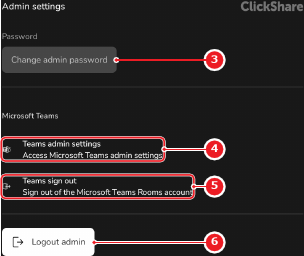
  1. Tap Logout admin (reference 6).

    Image 7–44
    1
    Admin name input field
    2
    Save button
    3
    Change password menu
    4
    Microsoft Teams settings link
    5
    Microsoft Teams logout button
    6
    Admin logout button

    A confirmation pop-up will be shown.

  2. Must the admin account be logged out?
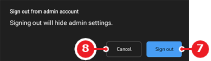
    • If yes, tap Sign out (reference 8) to view the ClickShare settings app as a user.
    • If no, tap Cancel (reference 7) to stay logged in as an admin.
    Image 7–45
    7
    Cancel button
    8
    Confirmation button