7.6.3 Time zone

Location & availability
About time zone

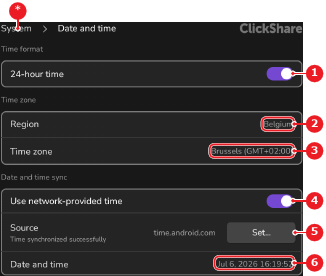
ClickShare uses the selected region to determine the time zone. Regions with multiple time zones will be able to select which specific time zone is used.

How to change
  1. Must the region be changed?

    • If yes, select the desired region from the drop down labelled with the current region (reference 2). Go to next step.
    • If no, go to next step.
    Image 7–25
    1
    Time format toggle
    2
    Region drop down
    3
    Time zone drop down
    4
    Network time toggle
    5
    Time server menu
    6
    Calendar menu
    *
    Return button
  2. Does the selected region have multiple time zones?

    • If yes, select the desired time zone from the drop down labelled with the current time zone (reference 3, Image 7–25).
    • If no, no further actions required.

    The time zone is changed across the entire ClickShare system.