Location & availability
- Menu: > > > >
- Access level: admin

Energy saver reduces the power usage of the ClickShare system when not actively being used. There are two options:
When using energy saver, the selected mode activates after a set time of inactivity.
ECO mode allows the Base Unit to wake up whenever activity is detected. The Wi-Fi, sensors and peripherals remain available and operational within a few seconds of activity. This makes the ClickShare system quick to respond while saving as much power as possible.
ECO mode reduces the Base Unit power usage to 7.00 W.

Deep sleep reduces the power consumption of the Base Unit to the minimum. The Wi-Fi, sensors and peripherals are turned off or set to minimal power usage. The Base Unit must be woken up before the ClickShare system can be used. For more information, see “Waking the Base Unit”.
Deep sleep mode reduces the Base Unit power usage to 0.30 W.
Must energy saver be used?
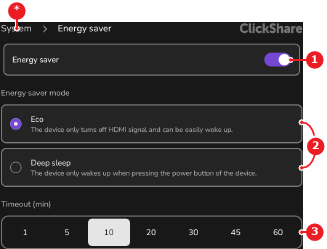
Tap on the desired mode after (reference 2, Image 7–32).
Tap on the desired minutes that must pass before the desired mode is activated after (reference 3, Image 7–32).
The selected option has a white background.