7.3.1 CEC

CEC
Consumer Electronics Control (CEC) is a protocol that allows commands to be sent over an ‘HDMI’ connection. These commands are commonly used to transfer peripheral information or actions from the main device to the device that is connected using ‘HDMI’.
Location & availability
About CEC

By default, CEC is turned on. This allows ClickShare transfer audio controls from the remote to the connected audio peripherals. Installations making use of the regular display without a Control Panel use CEC to transfer the mouse data from the display to the Base Unit.

How to toggle
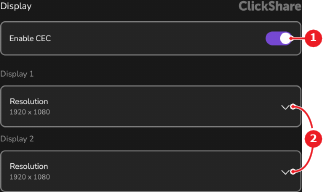
  1. Is the toggle button after Enable CEC (reference 1) blue?

    • If yes, tap the toggle button to disable CEC.
    • If no, tap the toggle button to enable CEC.
    Image 7–9
    1
    CEC toggle
    2
    Connected displays resolution drop down