About XMS Cloud linking
XMS Cloud linking is required for the Base Unit to function. The linking step can be completed before the configuration wizard procedure has been started. For more information, see “XMS Cloud linking”.

XMS Cloud linking is required for the Base Unit to function. The linking step can be completed before the configuration wizard procedure has been started. For more information, see “XMS Cloud linking”.
The ClickShare system must be up to date and the terms must be accepted before the XMS Cloud QR code is shown. For more information, see “Software and terms”.

Mobile phone with a built-in camera and internet access
Scan the QR code (reference 1) using the mobile phone.
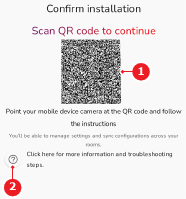
The XMS Cloud linking page is shown.