Location & availability
- Menu: > > >
- Access level: user

By default, the ClickShare settings app will open as a user account. This user account prompts an admin login screen when tapping on the menu. When the admin account is active, will show settings and options related to the admin account.

Most settings and options of the ClickShare system and the room system are locked behind a password protected admin account. This account is configured during the initial startup of the Base Unit.
Enter the name of the account in the input field labelled (reference 1).
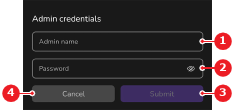
Enter the password of the account in the input field labelled (reference 2, Image 7–43).
Tap (reference 3, Image 7–43).
If the credentials are correct, the admin account is logged in and the user account is logged out.
 icon in the input field to see the entered password.