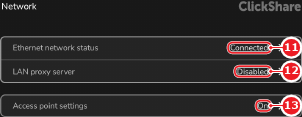
7.4.3 Access point

Access point
Access points are network devices that setup a wireless network. This wireless network will function as a standard network and create an IP address range, DHCP server and network traffic routing.
IP address
An IP address is a numeric address given to a device on a network. A generation four address (IPv4) is built up using four digits between ‘0’ - ‘255’, for example ‘192.168.0.50’. This allows different network devices to find each other on the network.
DHCP
Dynamic Host Configuration Protocol (DHCP) is a protocol that manages IP addresses. When a device is connected to a DHCP network, the DHCP server will assign an unused IP address to the connected device automatically. This ensures all connected devices have unique IP addresses, within the same range.
SSID
Service Set Identifier (SSID) is the name of a wireless network. By default this name is visible to all network devices with Wi-Fi that are in the area. The SSID can be seen as the name of the Wi-Fi network.
Location & availability
About Wi-Fi bands and channels

ClickShare supports the different frequencies for Wi-Fi signals. These frequencies are grouped into three main Wi-Fi bands:

Each band supports different channels with slightly different frequencies. These small differences allow different Wi-Fi channels to have an overlap without interfering with each other. Setting different channels for Wi-Fi signals that might have an overlap is called staggering. It is recommended to stagger Wi-Fi channels as much as possible across all wireless network devices.
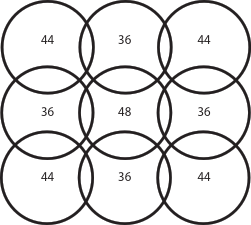
Image 7–15 Example of staggered 5 Ghz bands
How to configure
  1. Must the Base Unit send out a Wi-Fi network?
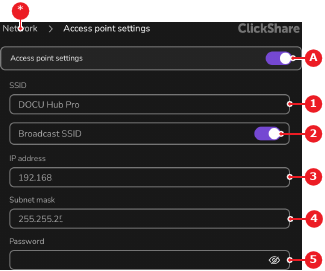
    • If no, disable the toggle button after Access Point Settings (reference 1). No further actions required.
    • If yes, enable the toggle button after Access Point Settings (reference 1).
    Image 7–16 Access point settings page part 1
    1
    Acces point toggle
    2
    SSID input field
    3
    SSID broadcast toggle
    4
    Access point IP address input field
    5
    Subnet mask input field
    6
    Wireless network password input field
    7
    Wireless network password confirmation input field
    *
    Return button
  2. Enter or update the desired name of the Wi-Fi network after SSID (reference 2, Image 7–16).

    Tip: Tap the x icon () in the input field to clear the entered data.
  3. Must the Wi-Fi network be visible to any Wi-Fi device?

    • If no, disable the toggle button after Broadcast SSID (reference 3, Image 7–16).
    • If yes, enable the toggle button after Broadcast SSID (reference 3, Image 7–16).
  4. Enter or update the IP address of the access point after IP address (reference 4, Image 7–16). (optional)

    Note: The IP address of the access point will become the default gateway of all wireless devices connected to the Wi-Fi.
    Tip: The default IP address of the access point is ‘192.168.2.1’.
    Tip: Tap the x icon () in the input field to clear the entered data.
  5. Enter or update the desired subnet mask of the access point after Subnet mask (reference 5, Image 7–16). (optional)

    Note: This subnet mask will decide the range of IP addresses available to the wireless devices that connect to the Wi-Fi.
    Tip: Tap the x icon () in the input field to clear the entered data.
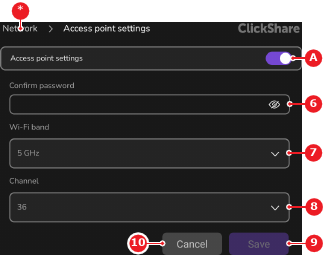
  6. Enter a password for the Wi-Fi network after Password (reference 6, Image 7–16).

    Note: The password must be at least 8 characters long.
    Tip: Tap the eye icon () in the input field to see the entered password.
  7. Enter the same password a second time after Confirm Password (reference 7, Image 7–16).

    Tip: Tap the eye icon () in the input field to see the entered password.
  8. Select the desired frequency after Wi-Fi Band (reference 8).

    Image 7–17 Access point settings page part 2
    1
    Acces point toggle
    5
    Subnet mask input field
    6
    Wireless network password input field
    7
    Wireless network password confirmation input field
    8
    Wi-Fi frequency band drop down
    9
    Wi-Fi channel drop down
    10
    Cacnel button
    11
    Save button
    *
    Return button
  9. Select the desired channel after Channel (reference 9, Image 7–17).

    Tip: The available channels depend on the chosen Wi-Fi band. Not all channels are available on every frequency band.
  10. Tap Save (reference 11, Image 7–17).