
2.11 Optional: VESA mount installation
This display, which comes standard attached to a stand, is compatible with the VESA 100 mm standard. This section details how to detach the panel from its stand and attach it to a VESA-compliant mount. If you plan to use the desktop stand, you may skip this chapter.
- Unlock the stand locking mechanism and put the display in the highest position.
- Put the display face down on a clean and soft horizontal surface. Be careful not to damage the panel screen.
Push a flathead screwdriver into the right VESA mount cover hole to unlock the cover, then lift the cover with the flathead screwdriver.
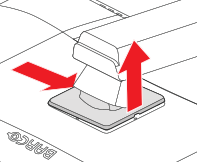
Image 2–8 Push a flathead screwdriver into the left VESA mount cover hole to unlock the cover, then lift the cover with the flathead screwdriver.
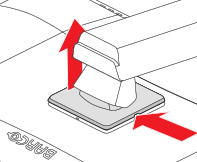
Image 2–9 Rotate the VESA mount cover to uncover the screws fixing the panel to the stand.
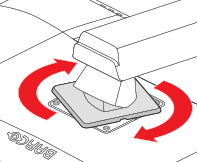
Image 2–10 Unscrew the 4 fixation screws while supporting the stand.
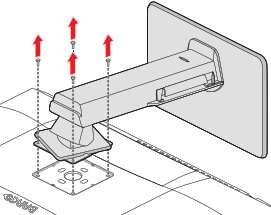
Image 2–11 Attach the panel firmly to the VESA mount using 4 M4 screws.
- Lmin = T + W + 8 mm
Lmax = T + W + 10,5 mm
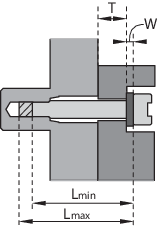
Image 2–12
