2.6 MST functionality (PbP Single Cable and DP OUT)
The Multi-Stream Transport (MST) protocol is a DisplayPort 1.2 technology that sends multiple video and audio streams through a single DisplayPort cable.
On this display, MST enables:
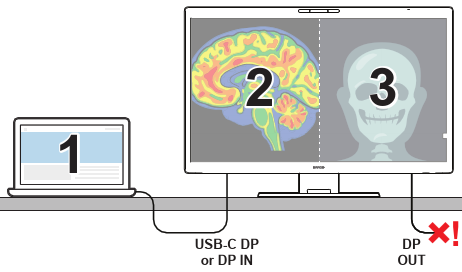
Virtual split-screen: Split the screen into two independent virtual monitors using the PbP Single Cable mode. A screen connected to the DP OUT port will lose its image.
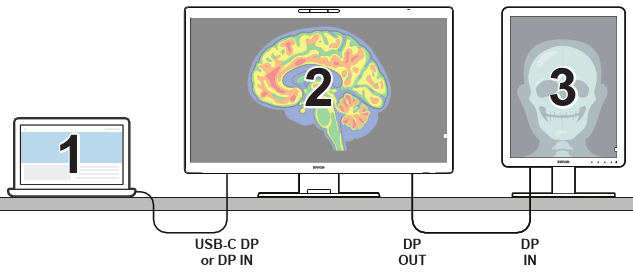
Daisy-chaining: Connect multiple external monitors in a sequence via the DP OUT port for easier cable management.
Image 2–4Virtual split-screen via PbP Single CableImage 2–5Daisy-chaining via the DP OUT port
MST key points
Daisy-chaining: Link displays in a chain using the DP OUT port.
Extended desktop: Expand your workspace across multiple monitors or two virtual screens, helpful for tasks that require a larger workspace, like diagnostic viewing.
High performance: Supports high resolutions and refresh rates for optimal image quality on each display or virtual screen.
System requirements for MST
For DisplayPort MST to function, you need:
A display controller supporting DisplayPort (1.2 or better) MST.
A DisplayPort 1.2 MST-capable monitor with MST mode enabled.
A DisplayPort cable for each monitor in the chain (for daisy-chaining). Use shorter cables to avoid cable clutter.
The operating system must have proper driver support. While fully supported in Microsoft Windows, MST hubs or DisplayPort daisy-chaining is currently not supported by macOS, including versions 10.15 ("Catalina") and later.