
This article guides you on where and how to check the current firmware version your ClickShare device is running on. There are multiple ways to check for:
- Checking firmware version using ClickShare Button
- Checking firmware version using ClickShare Desktop App
- Checking firmware version using ClickShare Configurator
- Checking firmware version using XMS Cloud
Note: If you're an end user and encounter difficulties with any of the steps or actions outlined in the procedures below, please contact your ClickShare admin with details of the issue, including reference to KB13401, for the necessary assistance.
A. Checking firmware version using ClickShare Button
-
Plug the ClickShare Button for your ClickShare device into the laptop’s USB port.
-
In the ClickShare Button client that opens, click the hamburger menu and then select About.
-
You can find the firmware version of your ClickShare device under the Base Unit information.

B. Checking firmware version using ClickShare Desktop App
-
Launch the ClickShare Desktop App and connect to your ClickShare device.
-
In the ClickShare Desktop App, click the hamburger menu and then select About.
-
You can find the firmware version of your ClickShare device under the Base Unit information.

C. Checking firmware version using ClickShare Configurator
-
Login to the ClickShare Configurator of your ClickShare device (how-to, see KB2324).
-
Navigate to Support & Updates > Firmware Update.
-
You can find the firmware version of your ClickShare device under the Firmware status.

D. Checking firmware version using XMS
-
Login to your XMS Cloud with your credentials (how to: see KB2534).
-
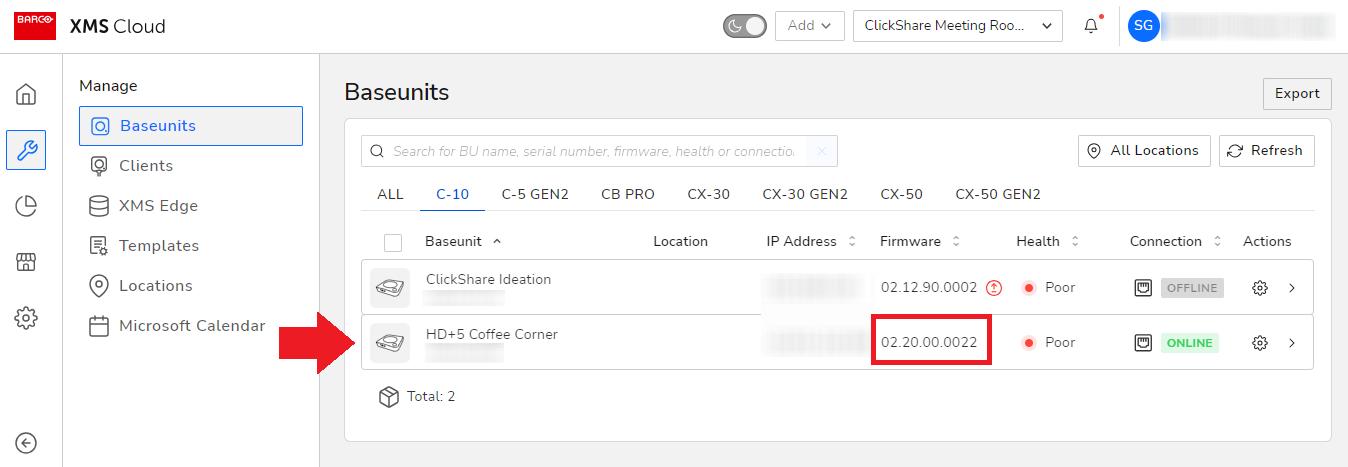
Go to the Manage > Baseunits page, then surf to your ClickShare device to check the currently installed or running firmware version.
Related Articles
- Where can I download the software/firmware for my ClickShare device
- Minimum firmware versions for ClickShare devices
- How to update the firmware on ClickShare Button?
- How do I downgrade the firmware on my ClickShare device?
- How to update the firmware on ClickShare Button?
- Troubleshooting firmware update on ClickShare Base Unit

