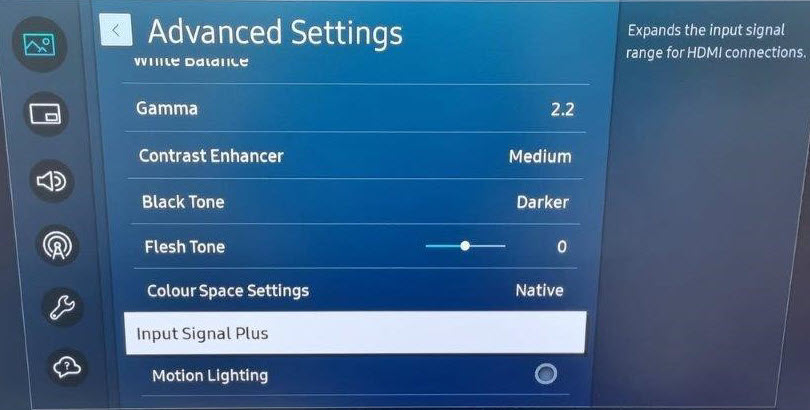
When the CX-50 boots, it's resolution is set to 60p/Hz and some Samsung monitors won't show 60p unless you activate Input Signal Plus on the HDMI™ port (Input Signal Plus is deactivated by default).
This was reported on several Samsung firmware’s.
During this process the monitor doesn't report back to the ClickShare Base Unit that 60p/Hz is unsupported and the ClickShare Base Unit doesn't fallback to a 30p/Hz signal on bootup resulting in non-booting of the ClickShare Base Unit (i.e. black image on the screen connected to it).
Solution:
In the Samsung display menu activate Input Signal Plus on the HDMI port (Input Signal Plus is deactivated by default).
This setting can be found under Picture > Advanced Settings > Input Signal plus > and select the corresponding HDMI input to activate it.