
When you're hosting a hybrid meeting and want to share the content of the meeting room display with the remote participants, you can now do so with one click.
As long as you're connected to a ClickShare Base Unit, whether by having a Button pugged in or through the ClickShare Desktop App, you can start sharing the meeting room display immediately from the video conferencing app you're using. You will also be able to share content from local users who haven’t joined the meeting in the UC&C app but have shared their content to the meeting room display.
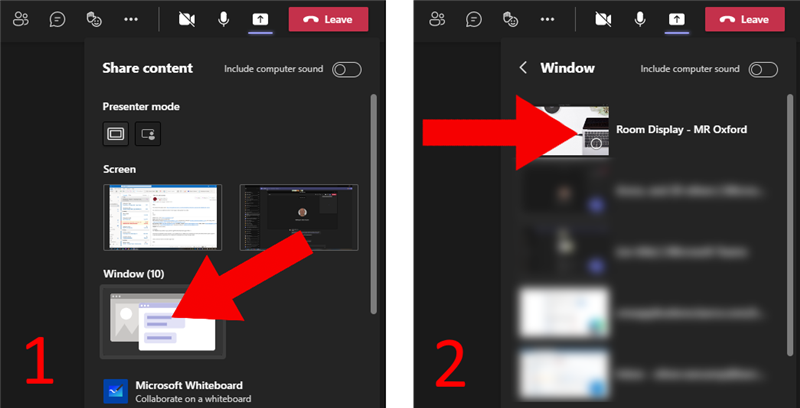
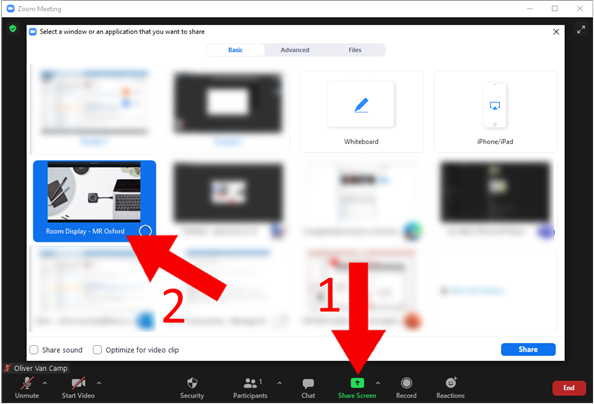
Simply go to the sharing function (1), and you'll see Room Display - <Meeting room name> (2) in the list of application windows you can share.
| Example: In Microsoft Teams, this looks like this | Example: In Zoom, this looks like this |
 |  |
Note: This is the quickest way to start sharing the room display remotely. Of course, the existing method of opening the Local View (View room display) through the ClickShare App menu and sharing the window is still possible.
Privacy and security
As soon as the Room Display window is visible, whether on a device in the room or for a remote participant, an indicator will appear on the status bar of the meeting room screen. This way no one can view or share the content being shown on the meeting room display without it being visible to everyone in the room.


