Barco 검색

myBarco 알림

읽지 않음

읽기

알림이 없습니다.

How to bulk register multiple ClickShare C/CX Base Units using device tokens?

상품 번호: [2287] - 레거시 코드: [11243]

적용 대상

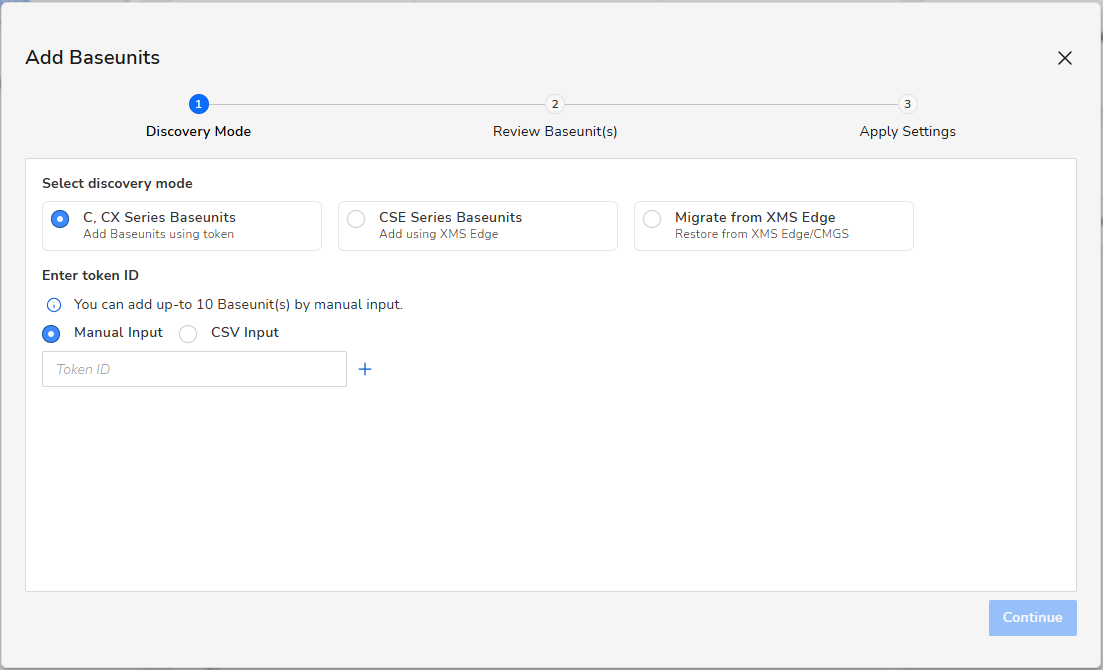
This article provides instructions on how to bulk-register ClickShare C-series and CX-series Base Units to the XMS Cloud using device tokens.


Notes:

  • The following information is applicable only to ClickShare Base Units (C-series and CX-series) running firmware version 2.17 and below.
  • For ClickShare C-series, CX-series and Bar Core/Pro running firmware version 2.18 and above.
    • No Bulk registrations methods are available
    • Devices can be registered individually using:
      • Registration via scanning QR code, see KB15557
      • Registration via clicking on Registration link, see KB10810
  • This information is not applicable to ClickShare Hub Core and Hub Pro.


Methods for bulk registration

You can register multiple ClickShare Base Units using two methods:

  1. Manual Input
  2. CSV Input


Detailed instructions

🔗For the most up-to-date and detailed instructions, please refer to the chapter How to add C or CX series Base Units using device token in the XMS Cloud User guide.


Related Articles

다운로드

특성

마지막 업데이트 2026. 9. 7.

해결책을 찾지 못하셨나요?

지원 티켓 접수

  • Technical questions
  • Return Material Authorization (RMA)
  • Status tracking of pending service requests
  • Consumable and spare parts orders

Barco AI assistant (Beta)

Our AI Assistant gives you immediate access to the full depth of our support knowledge—FAQs, detailed guides, and comprehensive PDF manuals.

Phone & email support

Our helpdesk provides you with prompt phone support. A team of experienced support engineers is at your service for any professional assistance.