Barco 검색

myBarco 알림

읽지 않음

읽기

알림이 없습니다.

How to update XMS (Virtual) Edge in offline mode to the latest firmware?

상품 번호: [2400] - 레거시 코드: [9845]

적용 대상

The easiest way to update XMS (Virtual) Edge in offline mode is via the XMS (Virtual) Edge web configurator.

  1. Make sure the latest update file is downloaded on your PC.

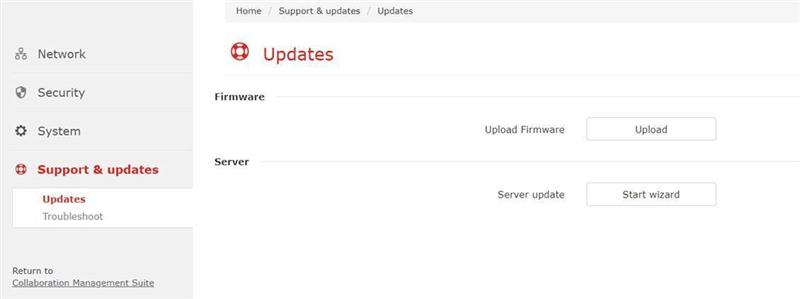
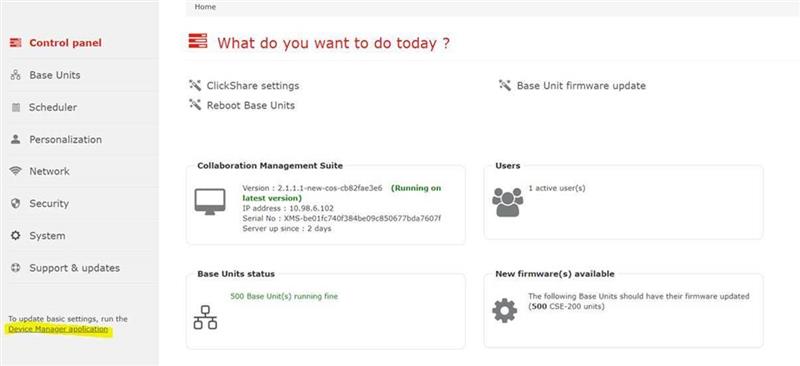
  2. Click Device Manager application at the bottom of the XMS Edge web page.
  3. Go to Support & Updates > Updates.

  4. Click Upload and select the downloaded update file on your PC.

  5. Return to the same page and click Start Wizard to update the firmware.

Upgrade via USB Drive
There is also the possibility to perform the upgrade of your XMS Edge via a USB drive.
Make sure the USB drive is bootable first and upload the same .deb file to it. Plug it into one of the USB ports of the XMS Edge; the upgrade will start automatically.

특성

마지막 업데이트 2026. 9. 7.

해결책을 찾지 못하셨나요?

지원 티켓 접수

  • Technical questions
  • Return Material Authorization (RMA)
  • Status tracking of pending service requests
  • Consumable and spare parts orders

Barco AI assistant (Beta)

Our AI Assistant gives you immediate access to the full depth of our support knowledge—FAQs, detailed guides, and comprehensive PDF manuals.

Phone & email support

Our helpdesk provides you with prompt phone support. A team of experienced support engineers is at your service for any professional assistance.