
CSM-1 Base Unit can be reset to its default factory settings in two ways:
Warning! Restoring to factory defaults will require re-pairing of the Buttons used with that Base Unit (how to: see KB5924).
A. Using web interface:
- Log in to the web interface of your Base Unit
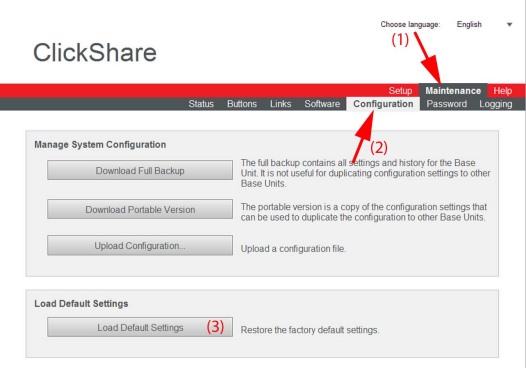
- Click the Maintenance tab (1), click Configuration (2) and then click on Load Default Settings (3) to restore the factory defaults settings.
B. Using reset button:
- Start up the Base unit.
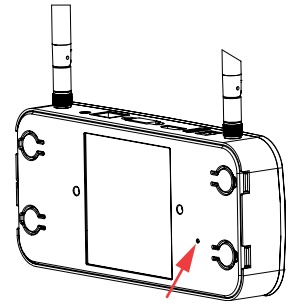
- When Barco logo appears on the meeting room screen, press the reset button (bottom side of the Base unit) Press this button until the Barco logo disappears and the LEDs are blinking red/white for at least 10 seconds.
- Release the button.
The Base unit will restart with its default configuration