
Yes, CEC (Consumer Electronics Control) is supported on the ClickShare CSE-200+, CX-series, and C-series Base Units, as well as on ClickShare CB Core and CB Pro.
CEC is a feature of HDMI™ that allows users to command and control devices connected through HDMI™ using only one remote control. It is not supported on the DisplayPort connections.
What CEC actions are implemented?
On the HDMI™ output:
- When turning the Display OFF, the ClickShare Base Unit will go to Eco Standby.
- When turning the Display ON, the ClickShare Base Unit will turn ON, when it's connected to the active input of the display
- When the ClickShare Base Unit receives a wake up, the Display will turn ON / Switch to the HDMI port connected.
- When selecting the HDMI™ input, connected to the ClickShare Base Unit, on the Display, the ClickShare Base Unit will resume.
On the HDMI input:
- When the ClickShare Base Unit is turned OFF, the Input device will turn OFF.
- When the Input device is turned ON, the ClickShare Base Unit will turn ON.
How to enable CEC?
On the HDMI™ output:
CEC can be enabled (or disabled) in the ClickShare Configurator: Display & Audio > Outputs.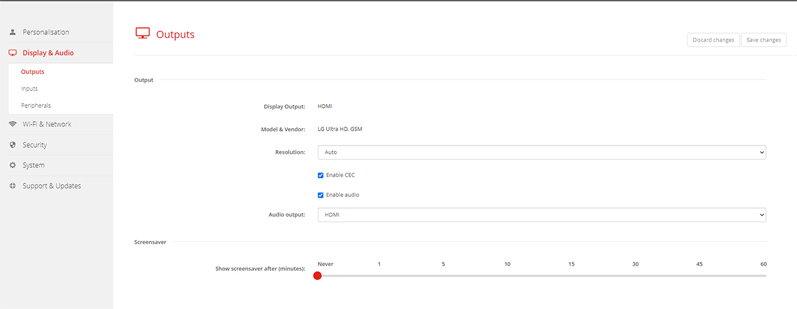
On the HDMI™ input:
When a HDMI™ input is available on the ClickShare Base Unit, CEC is enabled by default.
Info! There is NO CEC support when using the DP connectivity.

