

To connect the signal cables to the display:
To get access to the connectors, remove the connector compartment cover. See “Removing the connector compartment cover”
You may connect the display to a display controller by using the DVI or the DP connection. The input selection of the device is automatically done. By default, the DisplayPort input has priority over the DVI input. This can be changed in the OSD menu.
- Connect the DVI or DP of the display controller to the DVI or DP connector of the display.
If you want to make use of the display's USB upstream connector, connect a PC USB downstream connector to the display's USB upstream connector.
If you have chosen to use the display's USB downstream connector, connect a USB device to the downstream connector.
Connect the supplied external DC power supply to the +24 Vdc power input of the display.
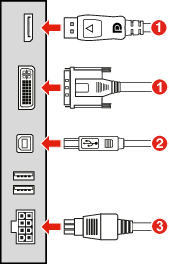
Image 2–4 - Plug the mains connector of the external DC power supply to a grounded power outlet by means of one of the supplied power cables.