17.9 Remove and clear metal front filter

Warning: Switch off the projector and unplug the power cord before starting the procedure.
Required parts

New filter when needed (available kit : R98010085, contains 5 HEPA filters and one cleanable filter)

How to remove
  1. Remove the front cover, see “Removal of the front cover”.
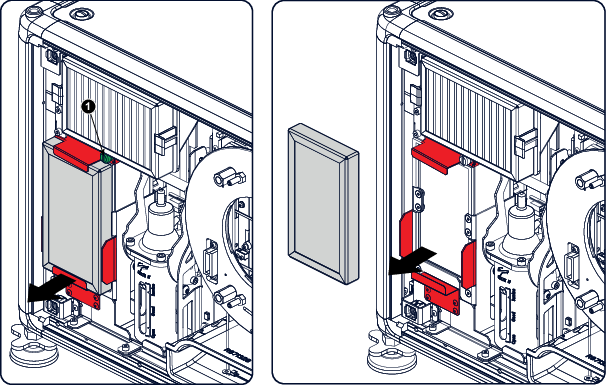
  2. Release the thumb screw (1)
  3. Pull the bottom holder to the front.

    Image 17–13
  4. At the same time, take out the filter.
Clean the dust filter
  1. Remove most contamination with a vacuum cleaner.
  2. Blow remaining dust away with compressed air in an other room or outside.
Tip: If you cannot clean the filter anymore, insert a new one.
How to install
  1. Pull the bottom holder to the front and insert the filter.
  2. Fasten the thumb screw (1).
Caution: Never use the projector with removed filters !