
About the control lock
As described in “Control lock”, the control lock can be enabled to avoid unwanted access. When the OSD is locked, pressing the  key after unlocking the keyboard will not activate the OSD menu, but will make the window appear. The OSD menu can only be accessed after pressing a sequence of keys.
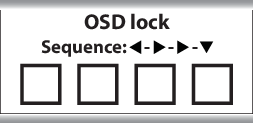
 ,
,  ,
, 