
Overview
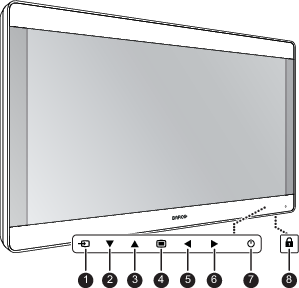
A 7-key capacitive keypad is located on the front of the display. By default only the stand-by key (7) is visible. For keyboard activation please refer to “Keyboard locking/unlocking”.
- Source shortkey
- Down key
- Up key
- OSD menu / Enter key
- Left / Brightness decrease key
- Right / Brightness increase key
- Stand-by key / Power mode LED
- Keyboard lock/unlock button (membrane switch at the bottom of the display)
