4.3.6 Unregister device

Location
How to unregister
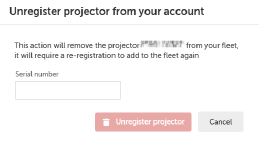
  1. Click Unregister projector.

    The Unregister projector from your account window will be prompted.

    Image 4–6
  2. Fill in the Serial number.
  3. Click Unregister projector.
Note: If the device is not online, unregister it from the Awaiting connection tab. For more information, see “Awaiting connection”.
Note: The device can be registered again. For more information, see “Device registration”.