2.3 Setting user preferences

About user preferences

Users can customize basic settings. These settings include:

Location
How to set
  1. Click the user icon at right side of the IMS main header.

  2. Select Preferences.

    The Preferences window will be prompted.

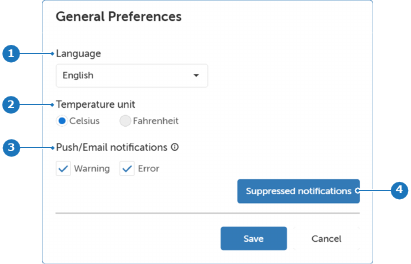
    Image 2–4 User settings, Preferences
    1
    Language preference
    2
    Temperature unit preference
    3
    Push/Email notifications
    4
    Suppress/Restore notifications
  3. Change the following settings if desired:

    • Language: Select the desired language from the drop-down list.
    • Temperature unit: Select the radio button of the desired temperature unit Celsius or Fahrenheit.
    • Push/Email notifications: Select or deselect the check box of the desired notification type Warning or Error:
    • Suppress notifications: Click Suppressed notification button to open the Restore Suppressed Notification window. For detailed instructions see procedure “Restoring suppressed notifications”.
  4. Click Save.