Location and availability
- Menu: > > >
- Access level: Power user, administrator, service
- Model: all
- Requirements: Pulse 2.10 or later

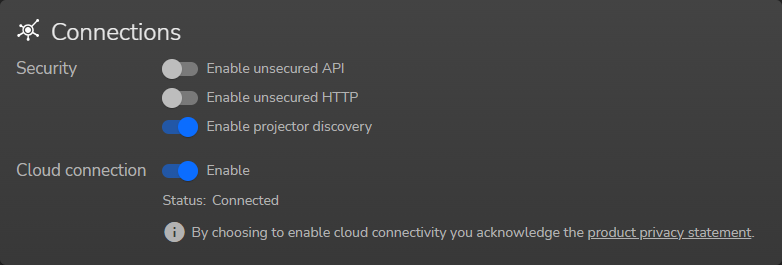
The Connections panel has the following enable toggles:
See the following pages for an explanation of each toggle.

Up until July 2025, TCP over port 9090 is the default way to communicate with the Json RPC API. However, since TCP is not encrypted, using this unsecure protocol risks exposing credentials and other sensitive information on the network.
From Pulse 2.10 and later, the default port will be 9091, which uses the encrypted TLS protocol instead.
From Pulse 2.7 onward, a toggle will be available that allows the administrator to manually enable or disable port 9090 and allow or restricts unsecured API access.

The default protocol to access the projector is HTTPS over the secure port 443 by default. From Pulse 2.10, unsecured HTTP over the unsecure port 80 is disabled by default.
From Pulse 2.9 onward, a toggle will be available that allows the user to manually enable or disable port 80 and allow or restricts unencrypted HTTP access.
In order for new projector to be found on the local network, the projector uses Avahi on the port 5353 to signal its location. This allows network administrators to find and control projectors on the network and add it to external tools like Pulse Toolset or Projector Toolset.
Once the projector configuration has been completed, and the network administration no longer deems it necessary to have the projector be visible on the network, it is advised to manually disable port 5353.
When is enabled and the projector is registered, the projector can be controlled remotely using Insights Management Suite. (e.g. checking the projector health, usage, reading diagnostic packages, etc). For more info on device registration, see “Device registration”
On Pulse 2.10 or later, while is enabled, the software update process can become automated. For more info on this, see “Automated update”.