
How to configure
Set the sound settings on the connected computer to the following:
- Sound output (speakers):
- Sound input (microphone):
Configure the volume of the speakers:
- Adjust the volume through the speaker settings of the connected computer.
- Adjust the volume on the Base Unit (reference 1 and 2, Image 4–16).
- Adjust or mute the volume through the ClickShare app (Image 4–17).
- Adjust or mute the volume with the ClickShare virtual remote (“Virtual remote”).
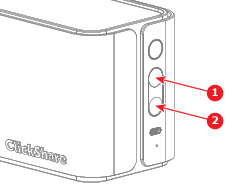
Image 4–16 Location of the volume buttons on the Base Unit - 1
- Volume up
- 2
- Volume down
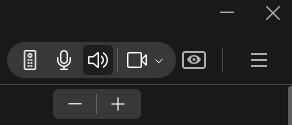
Image 4–17 Example of adjusting the volume in the app Verify the microphone sound by testing the microphone or mute the microphone.
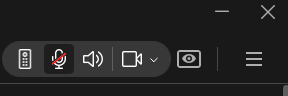
Image 4–18 Example of muting the microphone in the ClickShare app - Set the camera setting on the connected device to .
Manage the camera:
- Select the desired framing in the ClickShare app (Image 4–19).
- Manage the camera with the ClickShare virtual remote (“Virtual remote”).
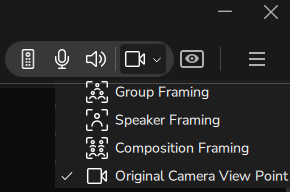
Image 4–19 Example of how to change the camera framing The peripherals have been setup successfully!