Location
- Navigation side bar:
- Central work window: or or

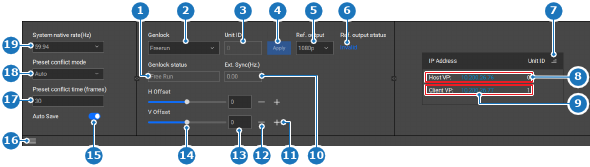
The system native rate determines at what clock pulse, in Hz, the units run. It is advised to set the native rate of all devices to the same Hz. This ensures minimum frames or gaps are present when communicating or dealing with signals.
Genlock uses the system native rate to maintain the sync between other devices. Genlock out always follows the same frequency as the system native rate. For more information about genlock, see “Genlock”.
Is the bottom panel hidden?
 ). Go to next step.
Select the desired system native rate from the drop down after (reference 19).

 ) in the header.