Availability
- Models: EC-210

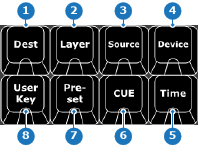
Any active category has the LED of the button turned on. It is not possible to have more than one category active at the same time. If the wrong category was accidentally pressed, then use the backspace key of the numpad to clear the wrong category before pressing another category. For more information, see “Numpad section”.
The target category sets the numpad to select the desired destination and/or layer targets. If a selection is already made, then these categories can be used to refine the selection. For more information, see “Numpad section”.
The action category sets the numpad to select any desired changes that must be recalled or applied. For more information, see “Numpad section”.
The other categories are categories that can not be chained together. These categories set the numpad to select which predefined functionality must be started. For more information, see “Numpad section”.