About widget panel
The widget panel automatically detects any created layouts. Layouts created in the front panel resolution (800x480) can be displayed on the front panel. For more information on how to create widgets, see “Creating a widget”.


The widget panel automatically detects any created layouts. Layouts created in the front panel resolution (800x480) can be displayed on the front panel. For more information on how to create widgets, see “Creating a widget”.
Select any compatible widget from the list (reference 3).

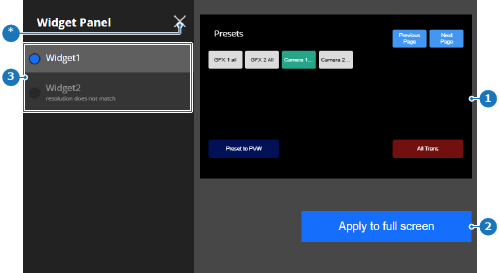
A preview of the widget (reference 1, Image 5–35) is shown.
 ) in the upper left corner.