8.13.7 Startup cue

Location
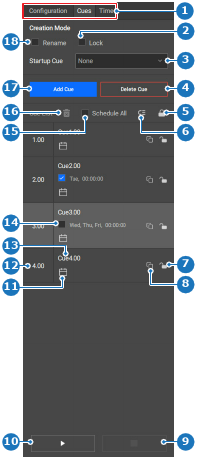
  1. Navigation side bar: External Devices & Cues
  2. Right panel: Cues
About startup cue

A startup cue is automatically run once the Encore3 is powered on. This cue is intended to wake up any connected devices and prepare everything to start operations automatically. However, any user created cue can be set as a startup cue.

Prerequisites

A cue must be created and configured. For more information, see “Managing actions”.

How to set
  1. Select any desired cue from the drop down after Startup Cue (reference 3).

    Image 8–149
    1
    Category selection
    2
    Lock new cue check box
    3
    Startup cue drop down
    4
    Delete selected cue button
    5
    Lock all cues
    6
    Reorder cues
    7
    Lock or unlock specific cue
    8
    Copy cue
    9
    Stop current cue
    10
    Play or pause current cue
    11
    Scheduling menu
    12
    Cue ID input field
    13
    Cue name input field
    14
    Cue schedule check box
    15
    Schedule all cues check box
    16
    Remove schedule from selected cue
    17
    Add cue button
    18
    Rename new cue check box

    The selected cue automatically plays when the unit starts up.