
6.6.3 Network configuration
About IP address
Two main methods for IP configuration are possible:
- Static mode, sets the Encore3 to a fixed IP address that is user defined.
- DHCP mode, means the Encore3 will request an IP address from the DHCP server of the network it is connected to.
How to manage
Select the desired mode from the drop down after (reference 1).
- In case of DHCP, go to step 3.
- In case of Static, go to next step.
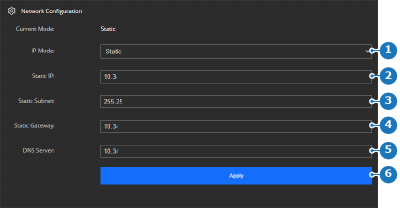
Image 6–31 - 1
- IP mode drop down
- 2
- IP address input field
- 3
- Subnet mask input field
- 4
- Default gateway IP address input field
- 5
- DNS server IP address input field
- 6
- Apply button
- Fill out the required network information (reference 2 through 5, Image 6–31). For more information, contact the local IT department.
Click on (reference 6, Image 6–31) to confirm the settings.

- Access the web page using the new IP address. For more information, see “Accessing the web page”.