About Button connection
The Button acts as a wireless connection between the Base Unit and the user device. With a Button connection no resources and no wireless capabilities of the user device are used to maintain the connection.

The Button acts as a wireless connection between the Base Unit and the user device. With a Button connection no resources and no wireless capabilities of the user device are used to maintain the connection.
A Button is paired (linked) to a specific Base Unit. The Button will always attempt to connect to the paired Base Unit regardless of meeting room or another Base Unit being nearby. It is strongly advised to keep the Button in the original meeting room and close to the paired Base Unit. If another Button must be used, then pair the Button to the Base Unit before attempting to connect. For more information, see the installation manual of the Base Unit.
The Button has two partitions. One for Windows and one for MacOS. The partition that matches the operating system of the user device is the one that is loaded. The other partition remains hidden.
The 5th gen Button or newer is based on the DisplayPort Alt Mode technology. Some mobile phones may use this technology mirror the mobile screen to the meeting room displays. This functionality is not actively supported by ClickShare. For the official mobile experience, see “Installing the Mobile App”..

Connect the Button to any free USB port of the user device as illustrated.
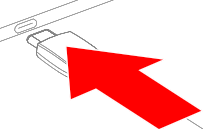
Wait until the Button LED ring is fully lit. The connection between the Base Unit and the user device is made.
Must the Button App be opened? (optional)