About CB Core, CB Pro
The CB Core, CB Pro have a built-in camera, speakers and microphones. These can be combined with other room peripherals.


The CB Core, CB Pro have a built-in camera, speakers and microphones. These can be combined with other room peripherals.
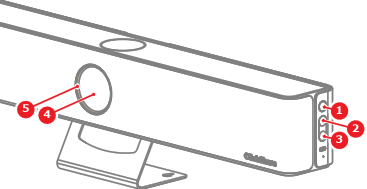
There is an LED ring around the camera of the Base Unit. The color and animation of the LED ring shows the current state of the Base Unit and connected peripherals. For more information on the possible states, see the following table:
| LED status | Meaning |
| Breathing white | Base Unit starting Base Unit standby |
| Red - purple spinning animation | Starting to share Updating software |
| Steady white | Sharing Base Unit powered on |
| Purple | Peripherals are being used |
| Red | Microphone muted |
| Blinking green | Button pairing in progress |
| Blinking red | Error |