Components
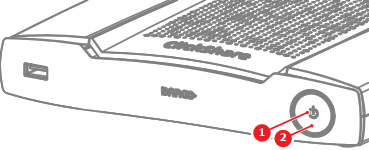
- 1
- LED ring
- 2
- Power button


There is an LED behind the power button of the Base Unit. The color and animation of the LED shows the current state of the Base Unit and connected peripherals. For more information on the possible states, see the following table:
| LED status | Meaning |
| Static white | Base Unit idle Button pairing completed |
| Blinking white | Base Unit starting Button pairing in progress Software update |
| Breathing white | ECO standby |
| Static red | Sharing |
| Blinking red | Error Base Unit rebooting |
| Off | Deep sleep |