Availability
- Operating system: Android and iOS
- Base Unit: C-5, C-10, CX-20, CX-30, CX-50, C-5 Gen2, C-10 Gen2, CX-20 Gen2, CX-30 Gen2, CX-M, CX-50 Gen2, CB Core and CB Pro
- Room feature: N/A

Screen sharing mirrors the entire screen of the user device to the room displays. Every action or change done on the user device is represented on the meeting room displays in real time.
When a specific app is being shared, then any actions or changes done to other apps of the user device are not visible to meeting room participants. Allowing the user to do actions in another app or make notes without the attendees seeing these actions on the connected displays. No content is changed on the meeting room displays as long as the app remains open on the user device. If the app is closed, then ClickShare automatically stops sharing. For more information, see “Stop sharing”.
ClickShare shares content to all connected displays. The shared content is identical on each display.
The user device must be connected to the ClickShare. For more information, see “Mobile App connection”.
Start the sharing using one of the following methods:

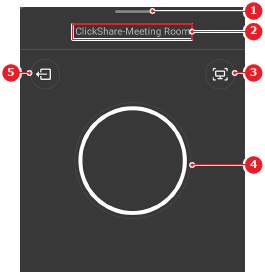
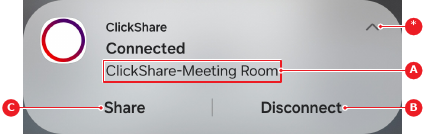
A casting window is shown.
Select what must be shared from the casting window drop down (reference 5).
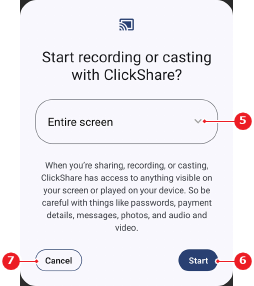
Is app sharing selected?
The selected content is shown on the meeting room displays.