3.4.3.3 PresentSense

About PresentSense

PresentSense uses the microphone of the device to detect an ultrasonic sound coming from the Base Unit. This ultrasonic sound is used to show the meeting room name in the meeting room list of the software. The Base Unit must be configured to send out this ultrasonic sound. For more information on how to configure PresentSense for the Base Unit, see the installation manual of the Base Unit.

Note: PresentSense is not available for the Hub Core and Hub Pro.
Prerequisites

The Mobile App must have permission to use the microphone. For more information, see the settings of the device.

Location

Options ()

How to toggle
  1. Is PresentSense allowed to use the microphone?

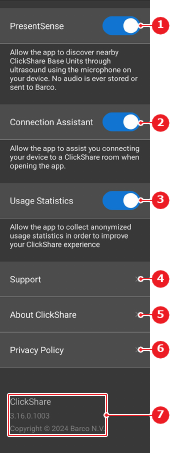
    • If yes, enable the slider after PresentSense (reference 1).
    • If no, disable the slider after PresentSense (reference 1).
    Image 3–17
    1
    PresentSense toggle
    2
    Connection assistant toggle
    3
    Usage statistics toggle
    4
    Barco support page link
    5
    Barco ClickShare link
    6
    Privacy policy link
    7
    Details section
  2. Connect to the Base Unit using PresentSense. For more information, see “Mobile App connection”.