2.1.6 Hub Core, Hub Pro

Note: This Base Unit is only compatible with a 5th gen Button. For more information, see “5th gen Button”.
Components

Front view:

Image 2–15
1
Front USB-C™ port
2
Device name label
3
Ultrasonic speaker
4
Power button

Hub Core back view:

Image 2–16
5
Reset button
6
Power USB-C™ port
7
LAN port
8
General purpose USB-A port
9
HDMI™ out port
10
General purpose USB-C™ port
11
Control Panel USB-C™ port
12
Wired video input USB-C™ port
13
Kensington™ lock

Hub Pro back view:

Image 2–17
5
Reset button
6
Power USB-C™ port
7
LAN port
8
General purpose USB-A 2 port
9
HDMI™ out 2 port
10
General purpose USB-A 1 port
11
HDMI™ out 1 port
12
General purpose USB-C™ 2 port
13
General purpose USB-C™ 1 port
14
Control Panel USB-C™ port
15
Wired sharing USB-C™ port
16
Kensington™ lock
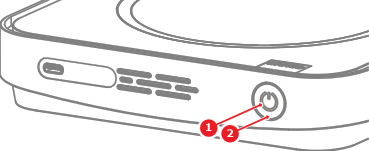
LED ring

There is an LED ring around the power button of the Base Unit. The color and animation of the LED ring shows the current state of the Base Unit and its peripherals. For more information on the possible states, see the following table:

LED statusMeaning
Steady whiteDevice powered on
Blinking white

Device starting

Device updating

Breathing whiteECO mode active
Steady redSharing
Blinking red

Pairing failed

Update failed