7.5.4 Managing paired devices

MAC address
A Media Access Control (MAC) address is a unique number for the network capabilities of a device. This number cannot be changed and is used as an identifier by the network.
Location & availability
About managing devices

Paired Bluetooth devices can be:

Prerequisites

Bluetooth must be on and the desired device must be paired with the ClickShare system. For more information, see:

How to manage
  1. Tap on the i icon () in the same row as the desired Bluetooth device.
  2. Must the device be renamed in the Bluetooth list of the ClickShare system?

    • If yes, tap the edit icon () and enter the desired name in the name input field (reference 1). Go to step 4.
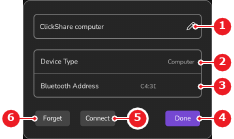
    • If no, go to next step.
    Image 7–22
    1
    Paired Bluetooth device name label or input field
    2
    Paired Bluetooth device type label
    3
    Paired Bluetooth device MAC address
    4
    Forget button
    5
    Connect or disconnect button
    6
    Confirmation button
  3. What must be done with the chosen device?

    • To connect to the device, tap Connect (reference 5, Image 7–22). No further actions required.
    • To disconnect from the device, tap Disconnect (reference 5, Image 7–22). No further actions required.
    • To remove the device from the Bluetooth list, tap Forget (reference 4, Image 7–22). No further actions required.
    Tip: Devices that are forgotten must be paired again before they can be used again. For more information, see “Pairing a device”.

    The pop-up closes.

  4. Tap Done (reference 6, Image 7–22).