7.5.3 Pairing a device

MAC address
A Media Access Control (MAC) address is a unique number for the network capabilities of a device. This number cannot be changed and is used as an identifier by the network.
Location & availability
About device pairing

Any device can be paired to the Bluetooth of the Base Unit. Most devices will not work correctly even when they are paired. The Base Unit supports the following devices:

Prerequisites

Bluetooth must be on before a device can be paired. For more information, see “Bluetooth functionality”.

How to pair
  1. Set the desired device in pairing mode. For more information, see the instructions of the manufacturer.
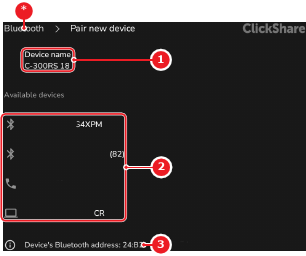
  2. Select the desired device from the Available devices (reference 2).

    Tip: To rename the Bluetooth device name of the Base Unit, see “Bluetooth functionality”.
    Image 7–21
    1
    Base Unit Bluetooth name
    2
    Detected devices
    3
    Base Unit Bluetooth MAC address
    *
    Return button

    A pop-up with a pairing verification is shown.

  3. Follow the pairing instructions on the pop-up.

    The Bluetooth device and the Base Unit are paired.

  4. Connect the Base Unit to the Bluetooth device. For more information, see “Managing paired devices”.