5.4.2 Mounting the Base Unit using the mounting base

About the mounting base

A mounting base is included with the Base Unit. This mounting base can be installed in one of the following methods:

About install locations

The Base Unit can be installed using the mounting base to the following options:

Tip: The Base Unit weighs: 720 g.
Required tools

Cleaning cloth

Required parts

Mounting base

How to stick
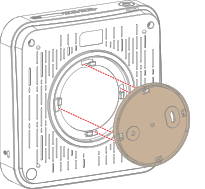
  1. Position the mounting base in the cutouts on the bottom of the Base Unit as illustrated.

    Image 5–27
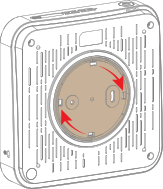
  2. Rotate the mounting base clockwise.

    Image 5–28
  3. Clean and dry the intend install area. Use cleaning cloth.
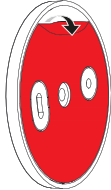
  4. Remove the protective foil to reveal the sticky layer.

    Image 5–29
  5. Press the assembled Base Unit firmly against the desired location with the adhesive side facing the wall or ceiling.
  6. Connect the desired cables to the Base Unit. For more information, see “Connecting the hardware”.