5.4.3 Securing the Base Unit using the mounting base

About the mounting base

A mounting base is included with the Base Unit. This mounting base can be installed in one of the following methods:

About install locations

The Base Unit can be installed using the mounting base to the following options:

Tip: The Base Unit weighs: 720 g.
Required parts
How to secure
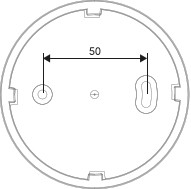
  1. Foresee two holes spaced 50 mm apart at the desired location.

    Image 5–30
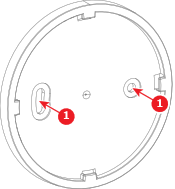
  2. Position the mounting base over the prepared holes.
  3. Tighten two screws (reference 1) through the mounting base. Provide two M4 screws, each at least 10 mm long.

    Image 5–31
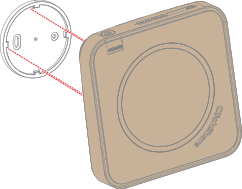
  4. Position the cutouts on the bottom of the Base Unit on the mounting base as illustrated.

    Image 5–32
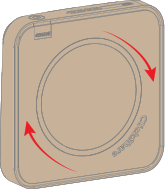
  5. Rotate the Base Unit clockwise.

    Image 5–33
  6. Connect the desired cables to the Base Unit. For more information, see “Connecting the hardware”.