5.4.5 Securing the cables in the mounting plate

About securing the cables

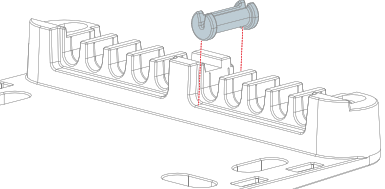
The mounting plate has 10 cutouts for cable management. These cutouts help ensure the cables stay in place regardless of orientation. Additional rubber rings can be used to help keep smaller cables securely in these cutouts.
Prerequisites

The Base Unit must be installed in the mounting plate before the cables can be secured. For more information, see “Securing the Base Unit using the mounting plate”.

Required tools

Phillips screwdriver PH2

Required parts

Rubber rings

How to secure
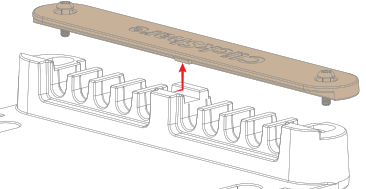
  1. Loosen the two screws (reference 2) holding the wire cover in place. Use a PH2 Phillips screwdriver.

    Image 5–39
  2. Slide the wire cover over the slots as illustrated.

    Image 5–40
  3. Connect the desired cables to the Base Unit. For more information, see “Connecting the hardware”.
  4. Install a rubber ring over each cable according to the diameter. (optional)

    • The cable is between 1.8 mm - 2.9 mm in diameter. Use the white ones
    • The cable is between 3.0 mm - 4.2 mm in diameter. Use the gray ones
    • The cable is between 4.3 mm - 5.2 mm in diameter. Use the black ones
    • The cable is between 5.3 mm - 6.0 mm in diameter. Use the red ones
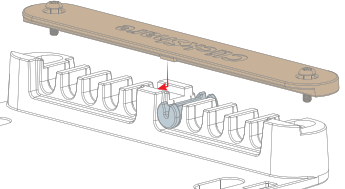
  5. Insert each cable and cable with a rubber ring into a slot as illustrated.

    Image 5–41
  6. Slide the wire cover over the slots as illustrated.

    Image 5–42
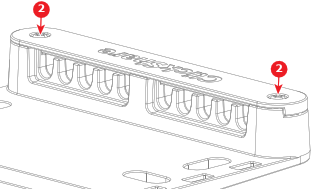
  7. Tighten the two screws (reference 2) to secure the wire cover. Use a PH2 Phillips screwdriver.

    Image 5–43