Transmitter and receiver
The installation procedure is the same for the receiver and the transmitter.

The installation procedure is the same for the receiver and the transmitter.
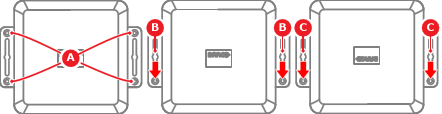
The USB-C Extension over CAT devices can be installed in any desired orientation using, at least two of, the four screw holes (reference A). The key holes can only be used when the USB-C Extension over CAT device is installed in an upright position (reference B) or upside down position (reference C)
The USB-C Extension over CAT devices can be mounted on the following surfaces:

Determine the location of the USB-C Extension over CAT transmitter and receiver. For more information, see “Signal direction”.
How will the USB-C Extension over CAT device be installed?
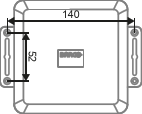
Must the USB-C Extension over CAT device be secured using the key holes?
Slide the keys of the USB-C Extension over CAT over the two prepared screws (reference 1) to lock the keys.
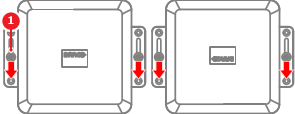
Tighten the two screws (reference 1, Image 5–46).
The USB-C Extension over CAT device is installed. Go to step 7.
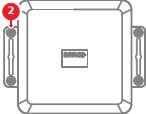
Position the USB-C Extension over CAT device over the prepared holes as illustrated.
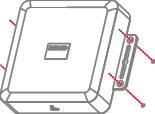
Tighten four M3.5 screws (reference 2), with a minimum length of 16 mm, to secure the USB-C Extension over CAT device in place.
Connect the cables to the USB-C Extension over CAT device.