5.4.5 Connecting the USB-C Extension over CAT transmitter

Wired charging

The USB-C Extension over CAT transmitter has an optional 100 W power supply. This power supply is used to charge any user device connected to the USB-C Extension over CAT transmitter through the ‘USB-C’ cable. The power supply is not required for any other functionality. Meaning, the power supply has no use for installations near the Base Unit.

The power supply keeps the USB-C Extension over CAT transmitter powered even when no connections are made. To minimize background power usage of the USB-C Extension over CAT transmitter, see “Powering off the USB-C Extension over CAT transmitter”.
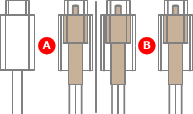
Included USB-C cables

The USB-C Extension over CAT kit includes two ‘USB-C’ cables. Each cable is designed for one of the USB-C Extension over CAT devices:

Image 5–49
Prerequisites

The USB-C Extension over CAT transmitter must be installed and an RJ-45 cable must be selected. For more information, see:

RJ-45 cable
An RJ-45 cable is a network cable that ends in a RJ-45 connector. Many different cables are compatible with an RJ-45 connector. For this reason, the cables are divided in categories based on maximum speed and cable design. These differences have a big impact on the quality of the RJ-45 cable.
HDBaseT
HDBaseT is a signal standard designed to transmit data over long distances without loss of information. HDBaseT can be configured to transmit a variety of data from video signals to commands over the same standard network cables.
Required parts

USB-C cable with a screw lock on one connector

How to connect
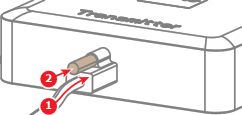
  1. Connect the ‘USB-C’ cable to the ‘USB-C’ port (reference 1) and tighten the screw lock (reference 2). Use the ‘USB-C’ cable with a screw lock on one connector.

    Image 5–50
  2. Install the end of the ‘USB-C’ cable without a screw lock.

    • For an installation near the Base Unit, connect to the Control Panel ‘USB-C’ port. For more information, see “Control Panel connection”.
    • For a wired video input installation, position the ‘USB-C’ cable in an easy accessible location in the meeting room.
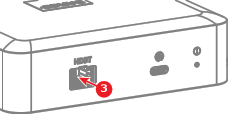
  3. Connect the selected RJ-45 cable to the HDBaseT port (reference 3).

    Image 5–51
  4. Must the charging functionality be available?

    Note: Only supported for the wired video input connection.
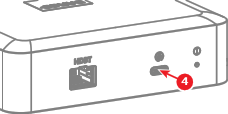
    • If yes, connect the power supply to the charging port (reference 4). Go to next step.
    • If no, go to next step.
    Image 5–52
  5. Is the USB-C Extension over CAT receiver installed and connected?