Powered down behavior
A powered off USB-C Extension over CAT transmitter powers back on the moment a signal is detected. When the signal is removed, the USB-C Extension over CAT transmitter must be powered off again using the power button.


A powered off USB-C Extension over CAT transmitter powers back on the moment a signal is detected. When the signal is removed, the USB-C Extension over CAT transmitter must be powered off again using the power button.
The USB-C Extension over CAT transmitter must be powered by the power supply and the wired video input ‘USB-C’ must be disconnected. For more information, see “Connecting the USB-C Extension over CAT transmitter”.
Small paperclip with a diameter of 1.5 mm or less
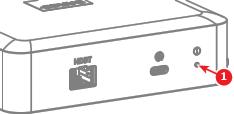
Press the power button (reference 1) to turn off the USB-C Extension over CAT transmitter. Use a small paperclip.