7.7.1 Logging

MDEP
Microsoft Device Ecosystem Platform (MDEP) is a security enhanced Android platform. MDEP is the operating system required for the ClickShare system to function.
Location & availability
About logs

Many different types of logs are collected by the ClickShare system for troubleshooting purposes. These logs are always available locally through the configurator. For more information, see “Download logs”. These logs can also be sent to the Microsoft Teams admin center for remote download.

How to set
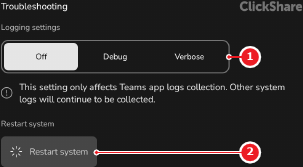
  1. Tap on the desired logging detail after Logging settings (reference 1).

    • Off, no ClickShare system nor MDEP logs are sent to the Microsoft Teams admin center. (default)
    • Debug, ClickShare system and basic MDEP logs are sent to the Microsoft Teams admin center.
    • Verbose, ClickShare system and detailed MDEP logs are sent to the Microsoft Teams admin center.
    Image 7–34
    1
    Logging detail options
    2
    Restart button
    5
    Reset type options
    6
    Reset button

    The selected option has a white background.