
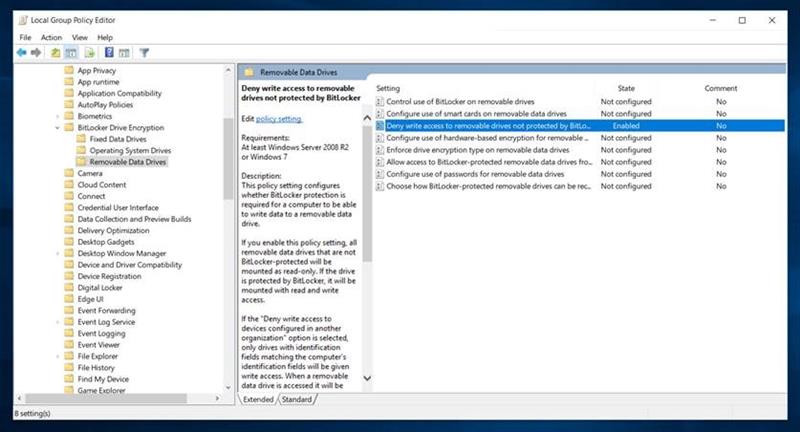
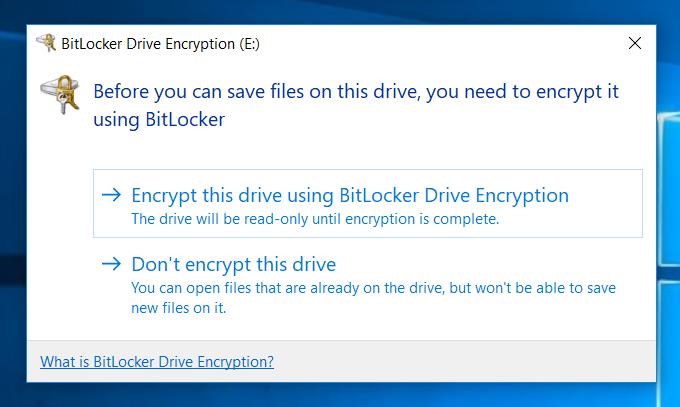
A problem arises if the user has enabled the group policy option "Deny write access" to removable drives not protected by BitLocker Every time the user plugs in the ClickShare Button, BitLocker will show a popup asking the user to encrypt the drive, even though the drive is read-only. The user can click this pop-up away and use the product, but the pop-up causes unnecessary confusion, frustration and security concerns.

Some tools are said to be able to whitelist the devices from Bitlocker [ More advanced features of BitLocker are triggered by end-point security tools (e.g. McAfee, Symantec, Sophos, TrendMicro,…). ] But we did not validate this ourselves, please verify with the provider.
We informed the BitLocker team and it was added on their list which is weighed against any other feature requests, it could be investigated in a future build cycles based on availability of resources.
If a customer were to raise this as an issue to Microsoft Support, or better yet if they are a customer with Microsoft Premier Support, they can elevate the priority directly with Microsoft.
Workaround;
The workaround Barco can offer is to deploy the ClickShare Desktop app.

