
There are two ways to reset the Base Unit to default settings:
- Software reset: Using ClickShare Configurator
- Hardware reset: Using Base Unit reset button
Warning!
Restoring to factory defaults will require re-pairing of the Buttons used with that Base Unit (how-to: see KB5924). If you do not pair, an error message will show up when plugging the Button into the laptop.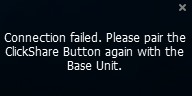
Method 1: Using ClickShare Configurator
- Log in to the Configurator (how-to: see KB2324).
- Click Support & Updates → Troubleshoot.
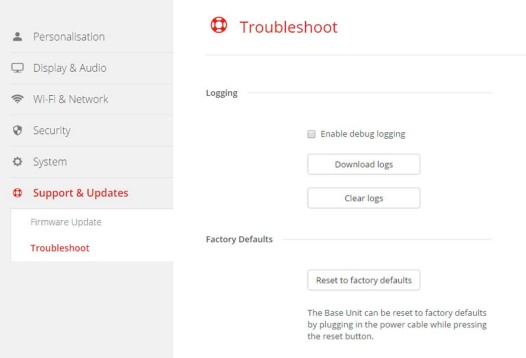
- Click Reset to factory defaults.
The following message is displayed: This action will remove all settings of the Base Unit and replace them with the default settings. Are you sure you want to continue? - If you want to continue, click Yes, remove all settings otherwise click No, I changed my mind.
When yes is clicked, the system starts a reboot.
Method 2: Using the Base Unit reset button
You need to have physical access to the device to perform the hardware reset.
- Disconnect the ClickShare power supply.
- Press and hold the reset button with a paperclip or something sharp.
The reset button can be located at the back of the ClickShare device (marked in yellow color in the respective images below).
For CS-100 (H) & CSE-200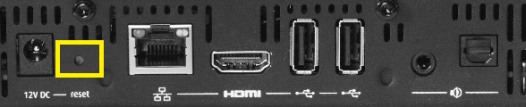
For CSE-200+
For CSE-800
- While holding the reset button, reconnect the ClickShare’s power supply.
- Hold the reset button until the red-white flash of the power button flashes white.
For CSE-200+, one needs to hold the reset button until the Base Unit's front LED flashes red white. This can take up to one minute.
Contact Barco Support
In case you are still unable to factory reset the Base Unit or are experiencing errors while performing a factory reset or face issues after completing the reset, please contact Barco support by raising a service ticket (how-to: see KB6024).

