Wired RoomDock is a feature of the CX-50 Gen2 where the user can share high resolution and frame rate content and connect to the room audio and video over a wired connection.
Wired RoomDock feature is also supported with the ClickShare Bar. For details, see KB11932.
Connection setup overview
- One or two screens
- No ClickShare specific drivers or app’s need to be installed
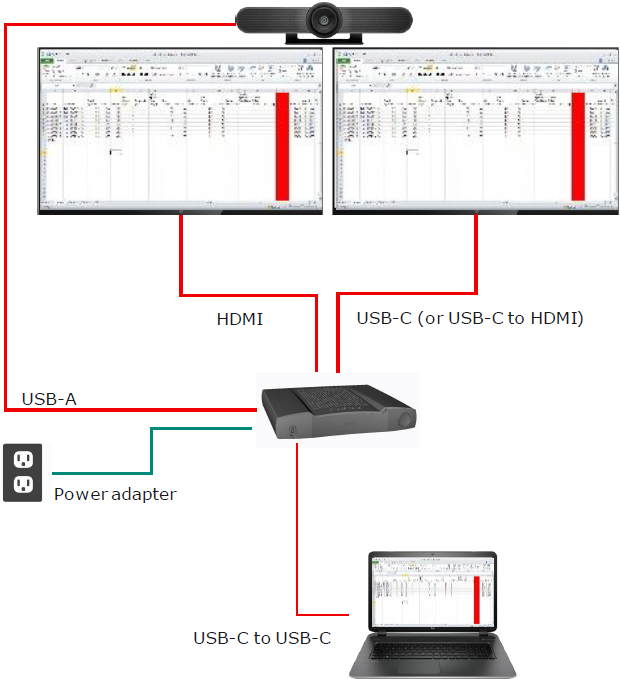
Important! Make sure that the laptop USB Type-C™ port of the Base port supports display port alternate mode.
To start using Wired RoomDock, connect the USB Type-C™ port from your laptop to the front USB Type-C™ input port of the Base Unit, - see reference 1 in the image below.
If your laptop USB Type-C™ port does NOT support display port alternate mode, you can also use the USB Type-C™ port on the Barco HDMI™-IN to Type-C converter kit (R9861581) - see reference 2 in the image below, for details see KB7199.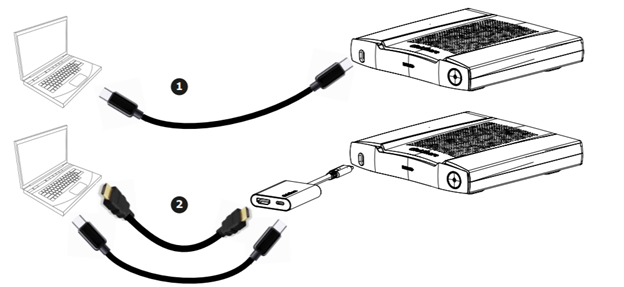
Tip: For information about the cable type used with Wired RoomDock, see KB6726.
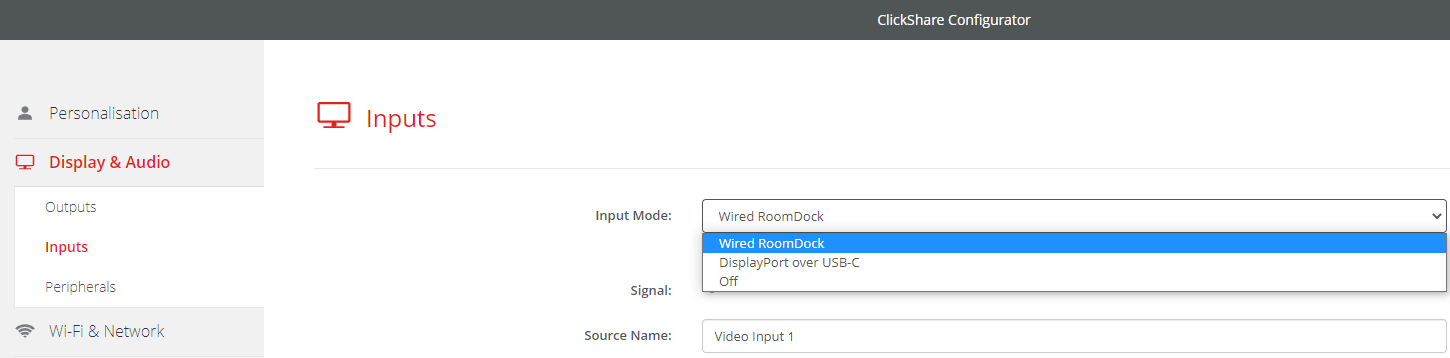
Before Wired RoomDock can be used, it must be configured in the ClickShare Configurator (Display & Audio > Input). For details, please check the installation manual.